Sonicware SmplTrek Portable Sampler

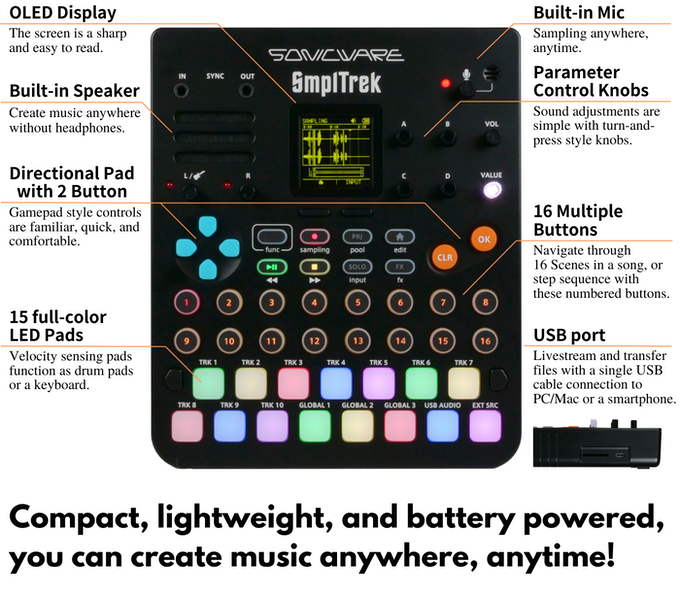
Sonicware komt met een portable sampler, de SmplTrek.

smpltrek.png


Dit is een kickstarter, maar deze heeft de target al ruim overschreden, dus hij gaat er komen.

smpltrek1.png


Een klein scherm hoeft niet onwerkbaar te zijn. Maar bij de grote hoeveelheid info & kleine fonts is dat wel zo.
Ik denk dat het voor mijn ogen echt wel te klein is, ook aangezien je veel van het scherm afhankelijk bent en er behoorlijk veel info op staat.
Wellicht is dat lofi-ding dan interessanter.
 
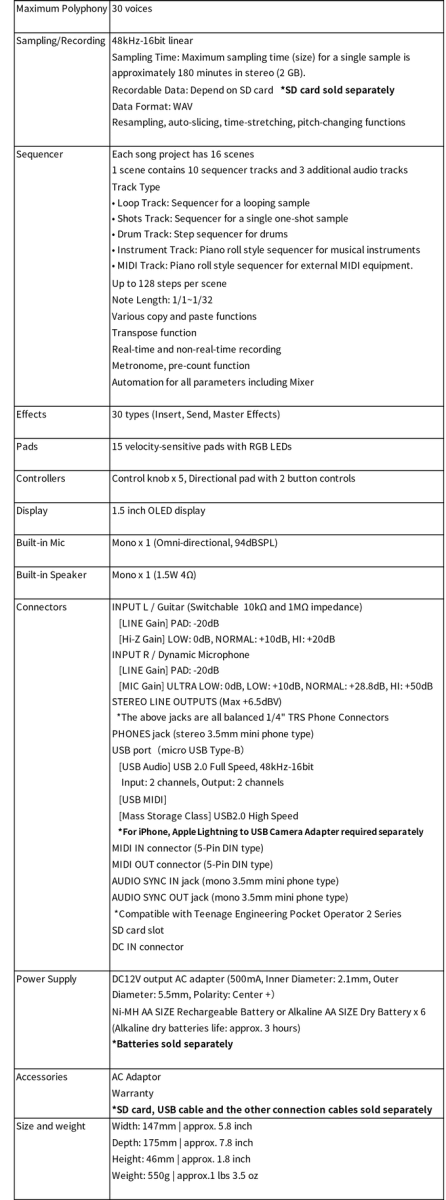
Mwa... geen resampling, 4 tracks, 4 sec, mono?, geen chops?

Het ziet er nog een beetje zo zo uit allemaal. Maar als de prijs zoals de andere in de liven serie is kan ik me wel voorstellen dat t voor de doelgroep interessant is. Niet voor mij iig

die eerste demo's richten zich niet echt op een vergelijking met 'de' 12-bit sound die je juist wil.. die van een S950 en Sp1200... Klinken gesampelde drums lekker bot, of hebben ze die 'ring' in de sound?

Samplen op 16-bit 24k klonkt nooit echt superdenderend,, en die 12 bit mode is een software effectje..

Niet kunnen resamplen is ook wel een minpunt idd... als je een externe recorder gebruikt heb je maar max 2 secs om bijvoorbeeld een reverb tail te samplen.. dat is te kort
 
Nog even over die Lofi 12... je speelt dus 1 sample in per keer (1 sample speelt over het gehele keyboard). Dus drums inkloppen kan niet.. je speelt 1 sound en de rest programmeer je in op de steps. Da's niet cool. Bij een Model:Samples kan je 6 drumsound indrummen (elke op hun eigen track), bij een Circuit Rythm kan je ook 8 drumsouns gebruiken....Bij die Lofi moeten ze aanpassen dat je een sample kan mappen op een key.. zodat je een kit samen kan stellen op de keys...
 
Ik zou het product ook niet te serieus nemen tbh. Als je al ziet dat een van de productfilmpjes in anime is geschoten..
 
Leuk sinterklaas kado idd voor een beginnende puber die into lofi hiphop is 😉

pubers die willen studeren of relaxen kopen dat ding.. ;)
Screenshot 2022-11-26 at 14.47.15.png


(dit kanaal staat ALTIJD op m'n YT homepage...)
 
Ik denk dat het voor mijn ogen echt wel te klein is, ook aangezien je veel van het scherm afhankelijk bent en er behoorlijk veel info op staat.
Wellicht is dat lofi-ding dan interessanter.
zo'n vergrootglas erop fabrieken past nnnet misschien ;)
 
Versie 2 van de firmware is uit:

Quick sampling
By putting pressure on the track pad, you can easily record a sample and then use that sample in a new track.
⁃ The new sampling procedure has made sampling faster by allowing the user to set the normalize, save location, and auto saving settings in advance.
⁃ The monitor output method has been revised so that the speaker can be used even when the built-in microphone is selected on the REC source.

Unquantized recording using real-time recording of micro timing
The micro timing of finger drumming and instrument playing with the pads can be recorded in real time in the sequencer to allow unquantized recording.(72 ppqn)
⁃ Micro timing can now be edited for each note.
⁃ Note-off timing can also be recorded and edited on Instrument tracks.

Swing functions
Swing can be set per track or clip. (0-75%)

Duplication of a sequence
A sequence created on the Drum, Inst, MIDI, and Shot track can be duplicated by pressing the DUP(C) button, doubling the length of the sequence.

Further Drum track improvements
⁃ Level, Pan, Pitch, and Effect Send for each instrument in the drum kit can be adjusted while the Drum track is playing.
⁃ The tempo can be changed on the Drum track (tap tempo can be achieved by pressing the knob).
⁃ Over 300 basic drum patterns to choose from.
⁃ 3 new drum kits have been added.
- Ski Beatz Smack pack selection kit
- Cinematic Indian Percussion kit
- GB Drum kit

Global Audio track has been optimized
⁃ The waveform display is now easier to read.
- Input level meter has been added.
(To delete the switching point of the virtual tracks, press the REC key twice and press CLR in recording standby.)

- You can replace the Global audio files in the SD card.

 
Versie 3 v/d firmware is uit:

What’s new in version 3.0.148

- Added Performance mode that allows you to play on the home screen


Press func + left selection button (under the screen) to play INST / DRUM / LOOP track.

Track selection is made with the up/down keys on the D-pad, and the following controls are also available using knobs A to D.

A : EQ/Filter Frequency
B : EQ/Filter Resonance (or Gain)
C : Effect Send
D : Level

Set the EQ type of the track in the mixer in advance.
The SmplTrek will exit performance mode when you move to another screen, but the above parameters will retain until the project is changed.


- Loop playback of a project

Loop playback of multiple scenes is now possible by defining loop start and end scenes.
A PLAYBACK menu has been added to SETTINGS in the PROJECT menu. From here you can set the MODE to LOOP and set LP START (LOOP START) and LP END (LOOP END).
The MODE can also be switched by pressing func+ the right selection button (under the screen) from the home screen.
*The Global track cannot be played during loop playback.


- Mono mode and legato mode are added to the INST track

Glide setting is also available.
Use the C and D knobs on the pull-up menu in the edit screen or in the track settings menu.


- Add transpose to INST / MIDI tracks


INST / MIDI tracks can be transposed on a track or clip basis.
Set this in TRANSPOSE in the track or clip settings.


- Auto-step recording function added to INST / DRUM / MIDI tracks

Press func + left selection button (under the screen) in each edit screen to choose between 1 or 2 steps of auto step and the cursor will advance by that number of steps each time a note or hit is recorded.


- Clip copy to another track

Clip copying is possible between tracks of the same type (clip copying is also possible between INST and MIDI tracks).


- Improvements to the track EQ

The source code has been optimized to eliminate noise when adjusting the track EQ.


- Metronome on/off while editing a clip

The metronome can be immediately turned on/off by pressing func + right selection button (under the screen) in the edit screen for any clip.

Even when the metronome is set to off you can use the pre-count setting. The metronome will count you in before recording and then will switch off automatically.


Numerous improvements and bug fixes have been made, including the return of the scene switching function using MIDI Program Change.

 
Back
Top